Lo primero que ve el usuario es la IU de la aplicación. Y en el desarrollo móvil, la mayoría de los desafíos están asociados con su construcción, y la mayor parte del tiempo el desarrollador pasa en el diseño del pastel de queso y la lógica de la capa de presentación. Hay muchos enfoques para resolver estos problemas en el mundo. Es probable que parte de lo que cubriremos ya esté en uso en la industria. Pero hemos intentado juntar algunos de ellos, y estamos seguros de que te será de utilidad.
Al comienzo del proyecto, queríamos llegar a un proceso de desarrollo de características de este tipo para realizar la menor cantidad posible de cambios en el código y, al mismo tiempo, satisfacer al máximo los deseos de los diseñadores, así como tener a mano una amplia gama de herramientas y abstracciones para lidiar con el texto estándar.
Este artículo será útil para aquellos que quieran dedicar menos tiempo a los procesos de diseño de rutina y la lógica repetitiva para procesar los estados de la pantalla.
Estilo de interfaz de usuario declarativo
Ver modificadores también conocido como decorador
Al comenzar el desarrollo, decidimos organizar la construcción de los componentes de la interfaz de usuario de la manera más flexible posible con la capacidad de ensamblar algo a partir de piezas listas para usar en el lugar.
Para ello, decidimos utilizar decoradores: corresponden a nuestra idea de sencillez y reutilización del código.
Los decoradores son una estructura de cierre que amplía la funcionalidad de la vista sin necesidad de herencia.
public struct ViewDecorator<View: UIView> {
let decoration: (View) -> Void
func decorate(_ view: View) {
decoration(view)
}
}
public protocol DecoratableView: UIView {}
extension DecoratableView {
public init(decorator: ViewDecorator<Self>) {
self.init(frame: .zero)
decorate(with: decorator)
}
@discardableResult
public func decorated(with decorator: ViewDecorator<Self>) -> Self {
decorate(with: decorator)
return self
}
public func decorate(with decorator: ViewDecorator<Self>) {
decorator.decorate(self)
currentDecorators.append(decorator)
}
public func redecorate() {
currentDecorators.forEach {
$0.decorate(self)
}
}
}
Por qué no usamos subclases:
Son difíciles de encadenar;
No hay forma de eliminar la funcionalidad de la clase principal;
Debe describirse por separado del contexto de uso (en un archivo separado)
UI .
.
static var headline2: ViewDecorator<View> {
ViewDecorator<View> {
$0.decorated(with: .font(.f2))
$0.decorated(with: .textColor(.c1))
}
}
, .
private let titleLabel = UILabel()
.decorated(with: .headline2)
.decorated(with: .multiline)
.decorated(with: .alignment(.center))
, , .
.
:
private let fancyLabel = UILabel(
decorator: .text("?? ???? ???"))
.decorated(with: .cellTitle)
.decorated(with: .alignment(.center))
:
private let fancyLabel: UILabel = {
let label = UILabel()
label.text = "???? ? ????"
label.numberOfLines = 0
label.font = .f4
label.textColor = .c1
label.textAlignment = .center
return label
}()
— 9 4. .
navigation bar , :
navigationController.navigationBar .decorated(with: .titleColor(.purple)) .decorated(with: .transparent)
:
static func titleColor(_ color: UIColor) -> ViewDecorator<UINavigationBar> {
ViewDecorator<UINavigationBar> {
let titleTextAttributes: [NSAttributedString.Key: Any] = [
.font: UIFont.f3,
.foregroundColor: color
]
let largeTitleTextAttributes: [NSAttributedString.Key: Any] = [
.font: UIFont.f1,
.foregroundColor: color
]
if #available(iOS 13, *) {
$0.modifyAppearance {
$0.titleTextAttributes = titleTextAttributes
$0.largeTitleTextAttributes = largeTitleTextAttributes
}
} else {
$0.titleTextAttributes = titleTextAttributes
$0.largeTitleTextAttributes = largeTitleTextAttributes
}
}
}
static var transparent: ViewDecorator<UINavigationBar> {
ViewDecorator<UINavigationBar> {
if #available(iOS 13, *) {
$0.isTranslucent = true
$0.modifyAppearance {
$0.configureWithTransparentBackground()
$0.backgroundColor = .clear
$0.backgroundImage = UIImage()
}
} else {
$0.setBackgroundImage(UIImage(), for: .default)
$0.shadowImage = UIImage()
$0.isTranslucent = true
$0.backgroundColor = .clear
}
}
}
:
navigation bar
override var navigationBarDecorators: [ViewDecorator<UINavigationBar>] {
[.withoutBottomLine, .fillColor(.c0), .titleColor(.c1)]
}
: , .
- : , .
HStack, VStack
, , , , . , .
, iOS . , .
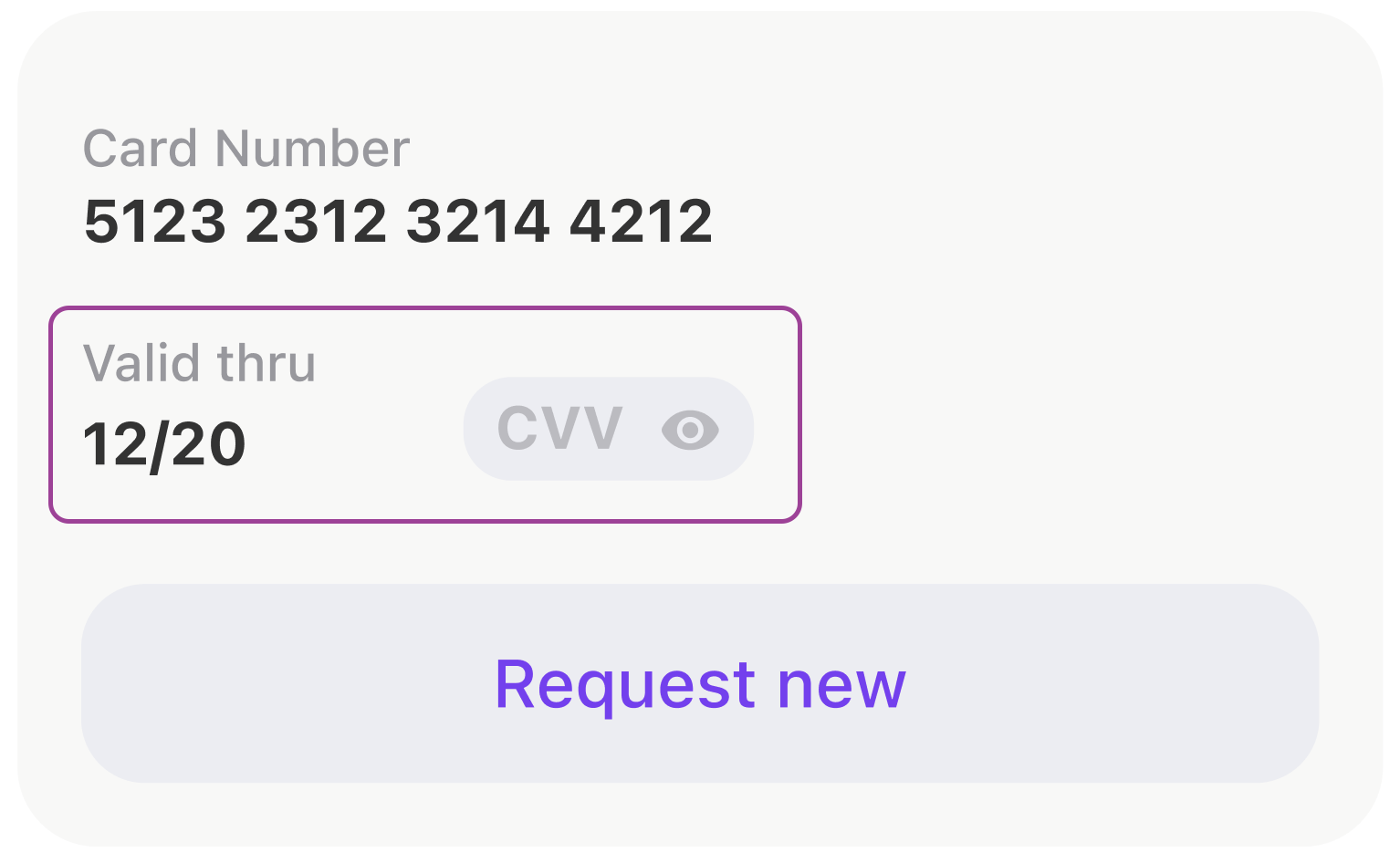
, .
- anchors.
[expireDateTitleLabel, expireDateLabel, cvcCodeView].forEach {
view.addSubview($0)
$0.translatesAutoresizingMaskIntoConstraints = false
}
NSLayoutConstraint.activate([
expireDateTitleLabel.topAnchor.constraint(equalTo: view.topAnchor),
expireDateTitleLabel.leftAnchor.constraint(equalTo: view.leftAnchor),
expireDateLabel.topAnchor.constraint(equalTo: expireDateTitleLabel.bottomAnchor, constant: 2),
expireDateLabel.leftAnchor.constraint(equalTo: view.leftAnchor),
expireDateLabel.bottomAnchor.constraint(equalTo: view.bottomAnchor),
cvcCodeView.leftAnchor.constraint(equalTo: expireDateTitleLabel.rightAnchor, constant: 44),
cvcCodeView.bottomAnchor.constraint(equalTo: view.bottomAnchor),
cvcCodeView.rightAnchor.constraint(equalTo: view.rightAnchor)
])
, UIStackView .
let stackView = UIStackView()
stackView.alignment = .bottom
stackView.axis = .horizontal
stackView.layoutMargins = .init(top: 0, left: 16, bottom: 0, right: 16)
stackView.isLayoutMarginsRelativeArrangement = true
let expiryDateStack: UIStackView = {
let stackView = UIStackView(
arrangedSubviews: [expireDateTitleLabel, expireDateLabel]
)
stackView.setCustomSpacing(2, after: expireDateTitleLabel)
stackView.axis = .vertical
stackView.layoutMargins = .init(top: 8, left: 0, bottom: 0, right: 0)
stackView.isLayoutMarginsRelativeArrangement = true
return stackView
}()
let gapView = UIView()
gapView.setContentCompressionResistancePriority(.defaultLow, for: .horizontal)
gapView.setContentHuggingPriority(.defaultLow, for: .horizontal)
stackView.addArrangedSubview(expiryDateStack)
stackView.addArrangedSubview(gapView)
stackView.addArrangedSubview(cvcCodeView)
, . . , WWDC SwiftUI. , Apple ! , , .
view.layoutUsing.stack {
$0.hStack(
alignedTo: .bottom,
$0.vStack(
expireDateTitleLabel,
$0.vGap(fixed: 2),
expireDateLabel
),
$0.hGap(fixed: 44),
cvcCodeView,
$0.hGap()
)
}
, SwiftUI
var body: some View {
HStack(alignment: .bottom) {
VStack {
expireDateTitleLabel
Spacer().frame(width: 0, height: 2)
expireDateLabel
}
Spacer().frame(width: 44, height: 0)
cvcCodeView
Spacer()
}
}
iOS- UITableView UICollectionView. , . , . : , . .
, . .
private let listAdapter = VerticalListAdapter<CommonCollectionViewCell>()
private let collectionView = UICollectionView(
frame: .zero,
collectionViewLayout: UICollectionViewFlowLayout()
)
.
func setupCollection() {
listAdapter.heightMode = .fixed(height: 8)
listAdapter.setup(collectionView: collectionView)
listAdapter.spacing = Constants.pocketSpacing
listAdapter.onSelectItem = output.didSelectPocket
}
. .
listAdapter.reload(items: viewModel.items)
, .
:
(UITableView -> UICollectionView).
,
,
, : , , , .
.
Shimmering Views
. (shimmering views).
- , UI .
, view, , .

, , .
SkeletonView, :
func makeStripAnimation() -> CAKeyframeAnimation {
let animation = CAKeyframeAnimation(keyPath: "locations")
animation.values = [
Constants.stripGradientStartLocations,
Constants.stripGradientEndLocations
]
animation.repeatCount = .infinity
animation.isRemovedOnCompletion = false
stripAnimationSettings.apply(to: animation)
return animation
}
:
protocol SkeletonDisplayable {...}
protocol SkeletonAvailableScreenTrait: UIViewController, SkeletonDisplayable {...}
extension SkeletonAvailableScreenTrait {
func showSkeleton(animated: Bool = false) {
addAnimationIfNeeded(isAnimated: animated)
skeletonViewController.view.isHidden = false
skeletonViewController.setLoading(true)
}
func hideSkeleton(animated: Bool = false) {
addAnimationIfNeeded(isAnimated: animated)
skeletonViewController.view.isHidden = true
skeletonViewController.setLoading(false)
}
}
, . :
setupSkeleton()
Smart skeletons
, , . , . .
- UI : , , , -:
public protocol SkeletonDrivenLoadableView: UIView {
associatedtype LoadableSubviewID: CaseIterable
typealias SkeletonBone = (view: SkeletonBoneView, excludedPinEdges: [UIRectEdge])
func loadableSubview(for subviewId: LoadableSubviewID) -> UIView
func skeletonBone(for subviewId: LoadableSubviewID) -> SkeletonBone
}
, , .
extension ActionButton: SkeletonDrivenLoadableView {
public enum LoadableSubviewID: CaseIterable {
case icon
case title
}
public func loadableSubview(for subviewId: LoadableSubviewID) -> UIView {
switch subviewId {
case .icon:
return solidView
case .title:
return titleLabel
}
}
public func skeletonBone(for subviewId: LoadableSubviewID) -> SkeletonBone {
switch subviewId {
case .icon:
return (ActionButton.iconBoneView, excludedPinEdges: [])
case .title:
return (ActionButton.titleBoneView, excludedPinEdges: [])
}
}
}
UI :
actionButton.setLoading(isLoading, shimmering: [.icon])
// or
actionButton.setLoading(isLoading, shimmering: [.icon, .title])
// which is equal to
actionButton.setLoading(isLoading)
, , , , .
, , . , .
, , , .
:
final class ScreenStateMachine: StateMachine<ScreenState, ScreenEvent> {
public init() {
super.init(state: .initial,
transitions: [
.loadingStarted: [.initial => .loading, .error => .loading],
.errorReceived: [.loading => .error],
.contentReceived: [.loading => .content, .initial => .content]
])
}
}
.
class StateMachine<State: Equatable, Event: Hashable> {
public private(set) var state: State {
didSet {
onChangeState?(state)
}
}
private let initialState: State
private let transitions: [Event: [Transition]]
private var onChangeState: ((State) -> Void)?
public func subscribe(onChangeState: @escaping (State) -> Void) {
self.onChangeState = onChangeState
self.onChangeState?(state)
}
@discardableResult
open func processEvent(_ event: Event) -> State {
guard let destination = transitions[event]?.first(where: { $0.source == state })?.destination else {
return state
}
state = destination
return state
}
public func reset() {
state = initialState
}
}
, .
func reloadTariffs() {
screenStateMachine.processEvent(.loadingStarted)
interactor.obtainTariffs()
}
, - .
protocol ScreenInput: ErrorDisplayable,
LoadableView,
SkeletonDisplayable,
PlaceholderDisplayable,
ContentDisplayable
, :
state machine :
final class DogStateMachine: StateMachine<ConfirmByCodeResendingState, ConfirmByCodeResendingEvent> {
init() {
super.init(
state: .laying,
transitions: [
.walkCommand: [
.laying => .walking,
.eating => .walking,
],
.seatCommand: [.walking => .sitting],
.bunnyCommand: [
.laying => .sitting,
.sitting => .sittingInBunnyPose
]
]
)
}
}
, ? .
public extension ScreenStateMachineTrait {
func setupScreenStateMachine() {
screenStateMachine.subscribe { [weak self] state in
guard let self = self else { return }
switch state {
case .initial:
self.initialStateDisplayableView?.setupInitialState()
self.skeletonDisplayableView?.hideSkeleton(animated: false)
self.placeholderDisplayableView?.setPlaceholderVisible(false)
self.contentDisplayableView?.setContentVisible(false)
case .loading:
self.skeletonDisplayableView?.showSkeleton(animated: true)
self.placeholderDisplayableView?.setPlaceholderVisible(false)
self.contentDisplayableView?.setContentVisible(false)
case .error:
self.skeletonDisplayableView?.hideSkeleton(animated: true)
self.placeholderDisplayableView?.setPlaceholderVisible(true)
self.contentDisplayableView?.setContentVisible(false)
case .content:
self.skeletonDisplayableView?.hideSkeleton(animated: true)
self.placeholderDisplayableView?.setPlaceholderVisible(false)
self.contentDisplayableView?.setContentVisible(true)
}
}
}
private var skeletonDisplayableView: SkeletonDisplayable? {
view as? SkeletonDisplayable
}
// etc.
}
.
.
, , , .
.
.
struct ErrorViewModel {
let title: String
let message: String?
let presentationStyle: PresentationStyle
}
enum PresentationStyle {
case alert
case banner(
interval: TimeInterval = 3.0,
fillColor: UIColor? = nil,
onHide: (() -> Void)? = nil
)
case placeholder(retryable: Bool = true)
case silent
}
ErrorDisplayable:
public protocol ErrorDisplayable: AnyObject {
func showError(_ viewModel: ErrorViewModel)
}
public protocol ErrorDisplayableViewTrait: UIViewController, ErrorDisplayable, AlertViewTrait {}
.
public extension ErrorDisplayableViewTrait {
func showError(_ viewModel: ErrorViewModel) {
switch viewModel.presentationStyle {
case .alert:
// show alert
case let .banner(interval, fillColor, onHide):
// show banner
case let .placeholder(retryable):
// show placeholder
case .silent:
return
}
}
}
, . , . , .
extension APIError: ErrorViewModelConvertible {
public func viewModel(_ presentationStyle: ErrorViewModel.PresentationStyle) -> ErrorViewModel {
.init(
title: Localisation.network_error_title,
message: message,
presentationStyle: presentationStyle
)
}
}
extension CommonError: ErrorViewModelConvertible {
public func viewModel(_ presentationStyle: ErrorViewModel.PresentationStyle) -> ErrorViewModel {
.init(
title: title,
message: message,
presentationStyle: isSilent ? .silent : presentationStyle
)
}
}
, , .
- 196,8934010152
- 138,2207792208
- 1
- 1
UI . , , .
, UI , , .
, -.
. . .
, . , , !