PD. Esta es una traducción de mi artículo en inglés. No he escrito sobre Habré en mucho tiempo. Lo siento de inmediato, no escribo mucho en ruso. No diré que mi inglés es magnífico. Pero, lamentablemente, vivir en el extranjero empeora mi ruso y poco a poco desarrolla el inglés.
Si utiliza AWS Athena para analizar registros, a menudo querrá encontrar el origen de las direcciones IP. Desafortunadamente, AWS Athena no proporciona esto de inmediato. Afortunadamente, MaxMind proporciona una base de datos de tablas GeoIP que le permite calcular la ubicación por dirección IP. Hay versiones gratuitas y de pago.
En este artículo, le mostraré cómo crear una función de AWS Lambda que descargue la última base de datos de MaxMind a S3 cada semana. Esta base de datos se puede utilizar en AWS Athena para escribir consultas SQL para su análisis, como registros web.
Crear una cuenta en MaxMind
Para descargar incluso bases de datos GeoLite 2 gratuitas con MaxMind, deberá crear una cuenta . Después de crear una cuenta, en Servicios, puede generar una clave de servicio. Guárdalo. Usaremos el formato GeoLite2-City-CSV .
Usando la clave de servicio, podemos intentar descargar la base de datos usando curl
curl -o GeoLite2-City-CSV.zip \
'https://download.maxmind.com/app/geoip_download?edition_id=GeoLite2-City-CSV&license_key={{YOUR_LICENSE_KEY}}&suffix=zip'
Las últimas instrucciones para descargar bases de datos GeoIP se pueden encontrar aquí .
Función AWS Lambda para actualizar la base de datos GeoIP en S3
Para mi propio proyecto, creé un S3 Bucket s3://app.loshadki.data
donde planeo alojar la base de datos GeoIP. Colocaré dos mesas a lo largo de los caminos
s3://app.loshadki.datadata/geoip_blocks/data.csv.gz
- base de máscaras IP y su posición GEO
s3://app.loshadki.datadata/geoip_locations/data.csv.gz
- decodificación de GEO en direcciones (países, ciudades).
Cree una nueva función de Lambda, nombré la mía GeoIP-Table-Update
y la uso python:3.8
.
Environment Variables :
MAXMIND_GEOIP_LICENSE
- Service Key MaxMind.
S3_BUCKET_NAME
- S3 Bucket, (app.loshadki.data
).
S3_BUCKET_PREFIX
- ,data

. Timeout 5 . Memory 256MB, CPU, CPU, . , , .

trigger. EventBridge (Cloud Watch Events), upload-geoip-to-s3-weekly
rate(7 days)
.
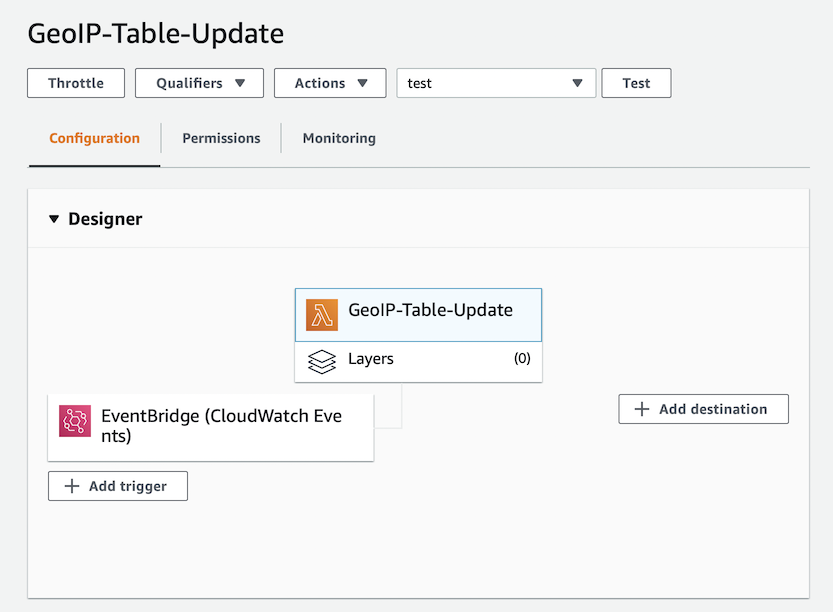
, AWS Lambda S3, , Role .
{
"Version": "2012-10-17",
"Statement": [
{
"Effect": "Allow",
"Action": "s3:PutObject",
"Resource": "arn:aws:s3:::app.loshadki.data/data/*"
}
]
}

. , Deploy . . , , S3.
import os
import os.path
import urllib.request
import shutil
import zipfile
import tempfile
import gzip
import boto3
def lambda_handler(event, context):
with tempfile.TemporaryDirectory() as tmpdirname:
zipfilename = os.path.join(tmpdirname, 'GeoLite2-City-CSV.zip')
print('step 1 - download geolite ip database')
download_geo_ip(tmpdirname, zipfilename)
print('step 2 - unzip all files')
unzip_all(tmpdirname, zipfilename)
print('step 3 - gzip files')
gzip_files(tmpdirname)
print('step 4 - upload to s3')
upload_to_s3(tmpdirname)
return
def download_geo_ip(tmpdirname, zipfilename):
geoip_url = 'https://download.maxmind.com/app/geoip_download?edition_id=GeoLite2-City-CSV&license_key={}&suffix=zip'.
format(os.getenv('MAXMIND_GEOIP_LICENSE'))
with urllib.request.urlopen(geoip_url) as response, open(zipfilename, 'wb') as output:
shutil.copyfileobj(response, output)
def unzip_all(tmpdirname, zipfilename):
# unzip all, but without the directories, to easily find the files
with zipfile.ZipFile(zipfilename, 'r') as z:
for member in z.namelist():
filename = os.path.basename(member)
# if a directory, skip
if not filename:
continue
# copy file (taken from zipfile's extract)
with z.open(member) as zobj:
with open(os.path.join(tmpdirname, filename), "wb") as targetobj:
shutil.copyfileobj(zobj, targetobj)
def gzip_files(tmpdirname):
for filename in ['GeoLite2-City-Blocks-IPv4.csv', 'GeoLite2-City-Locations-en.csv']:
file_path = os.path.join(tmpdirname, filename)
with open(file_path, 'rb') as f_in,
gzip.open(file_path + '.gz', 'wb') as f_out:
shutil.copyfileobj(f_in, f_out)
def upload_to_s3(tmpdirname):
s3_bucket_name = os.getenv('S3_BUCKET_NAME')
s3_bucket_prefix = os.getenv('S3_BUCKET_PREFIX')
s3_client = boto3.client('s3')
s3_client.upload_file(
os.path.join(tmpdirname, 'GeoLite2-City-Blocks-IPv4.csv.gz'),
s3_bucket_name,
os.path.join(s3_bucket_prefix, 'geoip_blocks/data.csv.gz')
)
s3_client.upload_file(
os.path.join(tmpdirname, 'GeoLite2-City-Locations-en.csv.gz'),
s3_bucket_name,
os.path.join(s3_bucket_prefix, 'geoip_locations/data.csv.gz')
)
AWS Athena
AWS Athena CSV , S3.
IP ( S3, CSV )
CREATE EXTERNAL TABLE IF NOT EXISTS default.geoip_blocks (
network STRING,
geoname_id INT,
registered_country_geoname_id INT,
represented_country_geoname_id INT,
is_anonymous_proxy INT,
is_satellite_provider INT,
postal_code STRING,
latitude DOUBLE,
longitude DOUBLE,
accuracy_radius INT
)
ROW FORMAT DELIMITED
FIELDS TERMINATED BY ','
LINES TERMINATED BY '\n'
LOCATION 's3://app.loshadki.data/data/geoip_blocks/'
TBLPROPERTIES ('skip.header.line.count'='1');
( S3 )
CREATE EXTERNAL TABLE IF NOT EXISTS default.geoip_locations (
geoname_id INT,
locale_code STRING,
continent_code STRING,
continent_name STRING,
country_iso_code STRING,
country_name STRING,
subdivision_1_iso_code STRING,
subdivision_1_name STRING,
subdivision_2_iso_code STRING,
subdivision_2_name STRING,
city_name STRING,
metro_code STRING,
time_zone STRING,
is_in_european_union INT
)
ROW FORMAT SERDE 'org.apache.hadoop.hive.serde2.OpenCSVSerde'
WITH SERDEPROPERTIES (
'separatorChar' = ',',
'quoteChar' = '\"',
'escapeChar' = '\\'
)
LOCATION 's3://app.loshadki.data/data/geoip_locations/'
TBLPROPERTIES ('skip.header.line.count'='1');
SQL
select *
from default.geoip_blocks t1
inner join default.geoip_locations t2 on t1.geoname_id = t2.geoname_id
limit 10
IP (CIDR lookup)
geoip_blocks
CIDR , 1.0.0.0/24
, 1.0.0.0
1.0.0.255
. Presto IP CIDR . AWS Athena ( 2) , Presto 0.217. .
IP Integer, ip_start <= ip_address <= ip_end
. IP Integer , ipv4[1]*256*256*256 + ipv4[2]*256*256 + ipv4[3]*256 + ipv4[4]
. /24
IP .
View geoip_blocks
CREATE OR REPLACE VIEW geoip_blocks_int AS
select
cast(ip[1] as BIGINT)*256*256*256 + cast(ip[2] as BIGINT)*256*256 + cast(ip[3] as BIGINT)*256 + cast(ip[4] as BIGINT) as ip_start,
(
bitwise_or(cast(ip[1] as BIGINT), bitwise_and(255, cast(power(2, greatest(8 - range, 0)) as BIGINT)-1))
)*256*256*256 +
(
bitwise_or(cast(ip[2] as BIGINT), bitwise_and(255, cast(power(2, greatest(16 - range, 0)) as BIGINT)-1))
)*256*256 +
(
bitwise_or(cast(ip[3] as BIGINT), bitwise_and(255, cast(power(2, greatest(24 - range, 0)) as BIGINT)-1))
)*256+
(
bitwise_or(cast(ip[4] as BIGINT), bitwise_and(255, cast(power(2, greatest(32 - range, 0)) as BIGINT)-1))
) as ip_end,
network,
geoname_id,
registered_country_geoname_id,
represented_country_geoname_id,
cast(is_anonymous_proxy as BOOLEAN) as is_anonymous_proxy,
cast(is_satellite_provider as BOOLEAN) as is_satellite_provider,
postal_code,
latitude,
longitude,
accuracy_radius
from
(
select
network,
geoname_id,
registered_country_geoname_id,
represented_country_geoname_id,
is_anonymous_proxy,
is_satellite_provider,
postal_code,
latitude,
longitude,
accuracy_radius,
split(network_array[1], '.') as ip,
cast(network_array[2] as BIGINT) as range
from
(
select
network,
geoname_id,
registered_country_geoname_id,
represented_country_geoname_id,
is_anonymous_proxy,
is_satellite_provider,
postal_code,
latitude,
longitude,
accuracy_radius,
split(network, '/') as network_array
from default.geoip_blocks
)
)
Probar los resultados
Por ejemplo, podemos intentar encontrar la ubicación de la dirección IP 1.1.1.1
. Solo necesitamos convertirlo a Integer nuevamente.

with ips as (
select
(
cast(ip_array[1] as BIGINT)*256*256*256 +
cast(ip_array[2] as BIGINT)*256*256 +
cast(ip_array[3] as BIGINT)*256 +
cast(ip_array[4] as BIGINT)
) as ip_int,
ip
from (
select
'1.1.1.1' as ip,
split('1.1.1.1', '.') as ip_array
) as source
)
select
ips.ip,
locations.continent_name,
locations.country_name,
locations.city_name,
locations.time_zone
from
ips as ips
left join geoip_blocks_int as blocks on blocks.ip_start <= ips.ip_int and ips.ip_int <= blocks.ip_end
left join geoip_locations as locations on blocks.geoname_id = locations.geoname_id
Bueno, una consulta SQL un poco más compleja si tiene registros de CloudFront para mostrar las páginas más populares agrupadas por país y ciudad.
with access_logs as (
select
uri,
(
cast(split(ip, '.')[1] as BIGINT)*256*256*256 +
cast(split(ip, '.')[2] as BIGINT)*256*256 +
cast(split(ip, '.')[3] as BIGINT)*256 +
cast(split(ip, '.')[4] as BIGINT)
) as ip_int
from (
select uri,
case xforwarded_for
when '-' then request_ip
else xforwarded_for
end as ip
from access_logs_yesterday
where
sc_content_type = 'text/html'
and status = 200
and method = 'GET'
and not regexp_like(url_decode(user_agent), '(bot|spider)')
)
)
select
count(*) as count,
access_logs.uri as uri,
locations.continent_name,
locations.country_name,
locations.city_name,
locations.time_zone
from
access_logs
left join geoip_blocks_int as blocks on
blocks.ip_start <= access_logs.ip_int and access_logs.ip_int <= blocks.ip_end
left join geoip_locations as locations on blocks.geoname_id = locations.geoname_id
group by 2, 3, 4, 5, 6
order by 1
¿Que sigue?
Puede utilizar columnas postal_code
o city_name
junto country_name
con AWS QuickSight para crear informes. También creé una alerta de CloudWatch para mí, si la función se cae más de 2 veces, para saber si algo está roto.