En el artículo anterior, hablé sobre una de las formas de implementar subprocesos múltiples en una aplicación Kotlin Multiplatform. Hoy consideraremos una situación alternativa cuando implementamos una aplicación con el código común más compartido, transfiriendo todo el trabajo con subprocesos a una lógica común.
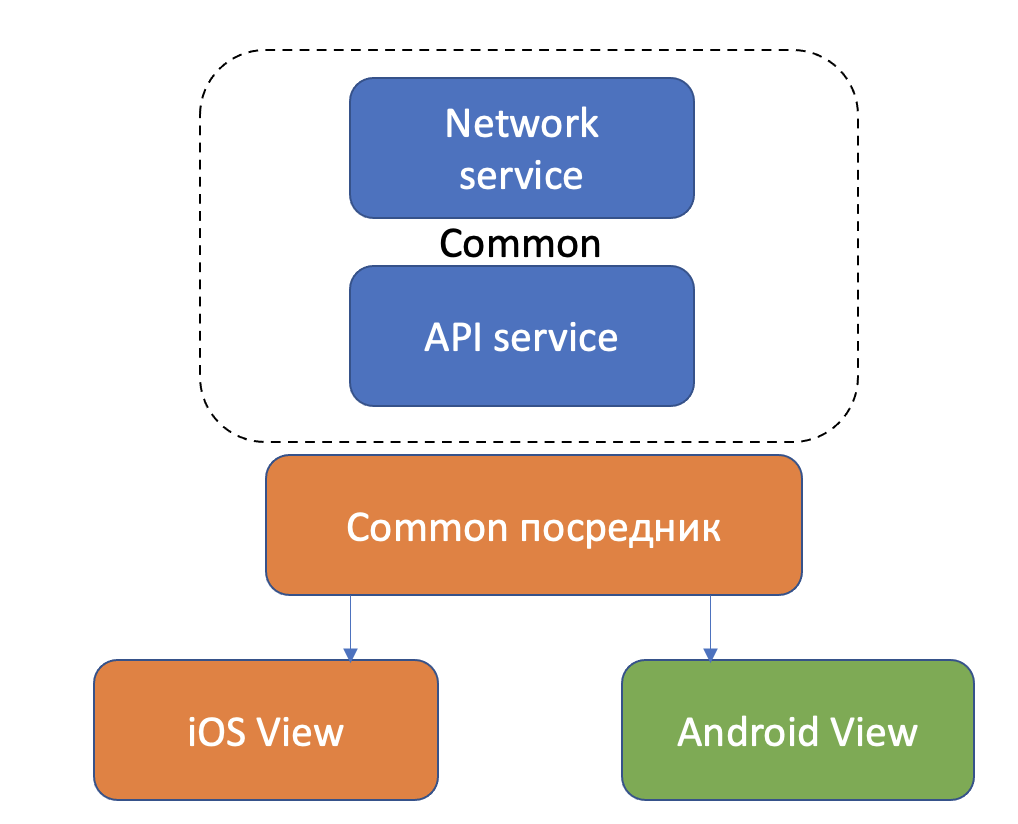
En el ejemplo anterior, nos ayudó la biblioteca Ktor, que se hizo cargo de todo el trabajo principal de proporcionar asincronía en el cliente de red. Esto nos salvó de tener que usar DispatchQueue en iOS en ese caso particular, pero en otros tendríamos que usar un trabajo de ejecución en cola para invocar la lógica de negocios y manejar la respuesta. En el lado de Android, usamos MainScope para llamar a una función suspendida.
Entonces, si queremos implementar un trabajo uniforme con multihilo en un proyecto común, entonces necesitamos configurar correctamente el alcance y contexto de la corrutina en la que se ejecutará.
Empecemos de forma sencilla. Creemos nuestro mediador arquitectónico que llamará a los métodos de servicio en su alcance, obtenido del contexto de la corrutina:
class PresenterCoroutineScope(context: CoroutineContext) : CoroutineScope {
private var onViewDetachJob = Job()
override val coroutineContext: CoroutineContext = context + onViewDetachJob
fun viewDetached() {
onViewDetachJob.cancel()
}
}
//
abstract class BasePresenter(private val coroutineContext: CoroutineContext) {
protected var view: T? = null
protected lateinit var scope: PresenterCoroutineScope
fun attachView(view: T) {
scope = PresenterCoroutineScope(coroutineContext)
this.view = view
onViewAttached(view)
}
}
Llamamos al servicio en el método mediador y lo pasamos a nuestra interfaz de usuario:
class MoviesPresenter:BasePresenter(defaultDispatcher){
var view: IMoviesListView? = null
fun loadData() {
//
scope.launch {
service.getMoviesList{
val result = it
if (result.errorResponse == null) {
data = arrayListOf()
data.addAll(result.content?.articles ?: arrayListOf())
withContext(uiDispatcher){
view?.setupItems(data)
}
}
}
}
//IMoviesListView - /, UIViewController Activity.
interface IMoviesListView {
fun setupItems(items: List<MovieItem>)
}
class MoviesVC: UIViewController, IMoviesListView {
private lazy var presenter: IMoviesPresenter? = {
let presenter = MoviesPresenter()
presenter.attachView(view: self)
return presenter
}()
override func viewWillAppear(_ animated: Bool) {
super.viewWillAppear(animated)
presenter?.attachView(view: self)
self.loadMovies()
}
func loadMovies() {
self.presenter?.loadMovies()
}
func setupItems(items: List<MovieItem>){}
//....
class MainActivity : AppCompatActivity(), IMoviesListView {
val presenter: IMoviesPresenter = MoviesPresenter()
override fun onResume() {
super.onResume()
presenter.attachView(this)
presenter.loadMovies()
}
fun setupItems(items: List<MovieItem>){}
//...
Para crear correctamente un alcance a partir de un contexto de corrutina, necesitamos configurar un despachador de corrutina.
Esta lógica depende de la plataforma, por lo que usamos la personalización con esperado / real.
expect val defaultDispatcher: CoroutineContext
expect val uiDispatcher: CoroutineContext
uiDispatcher será responsable de trabajar en el hilo de la interfaz de usuario. defaultDispatcher se utilizará para trabajar fuera del hilo de la interfaz de usuario.
La forma más sencilla de crearlo es en androidMain, porque Kotlin JVM tiene implementaciones listas para usar para despachadores de rutina. Para acceder a los flujos correspondientes, usamos CoroutineDispatchers Main (flujo de UI) y Default (estándar para Coroutine):
actual val uiDispatcher: CoroutineContext
get() = Dispatchers.Main
actual val defaultDispatcher: CoroutineContext
get() = Dispatchers.Default
El MainDispatcher se selecciona para la plataforma bajo el capó del CoroutineDispatcher utilizando la fábrica de despachadores MainDispatcherLoader:
internal object MainDispatcherLoader {
private val FAST_SERVICE_LOADER_ENABLED = systemProp(FAST_SERVICE_LOADER_PROPERTY_NAME, true)
@JvmField
val dispatcher: MainCoroutineDispatcher = loadMainDispatcher()
private fun loadMainDispatcher(): MainCoroutineDispatcher {
return try {
val factories = if (FAST_SERVICE_LOADER_ENABLED) {
FastServiceLoader.loadMainDispatcherFactory()
} else {
// We are explicitly using the
// `ServiceLoader.load(MyClass::class.java, MyClass::class.java.classLoader).iterator()`
// form of the ServiceLoader call to enable R8 optimization when compiled on Android.
ServiceLoader.load(
MainDispatcherFactory::class.java,
MainDispatcherFactory::class.java.classLoader
).iterator().asSequence().toList()
}
@Suppress("ConstantConditionIf")
factories.maxBy { it.loadPriority }?.tryCreateDispatcher(factories)
?: createMissingDispatcher()
} catch (e: Throwable) {
// Service loader can throw an exception as well
createMissingDispatcher(e)
}
}
}
Es lo mismo con Default:
internal object DefaultScheduler : ExperimentalCoroutineDispatcher() {
val IO: CoroutineDispatcher = LimitingDispatcher(
this,
systemProp(IO_PARALLELISM_PROPERTY_NAME, 64.coerceAtLeast(AVAILABLE_PROCESSORS)),
"Dispatchers.IO",
TASK_PROBABLY_BLOCKING
)
override fun close() {
throw UnsupportedOperationException("$DEFAULT_DISPATCHER_NAME cannot be closed")
}
override fun toString(): String = DEFAULT_DISPATCHER_NAME
@InternalCoroutinesApi
@Suppress("UNUSED")
public fun toDebugString(): String = super.toString()
}
Sin embargo, no todas las plataformas tienen implementaciones de despachador de rutina. Por ejemplo, para iOS, que funciona con Kotlin / Native, no con Kotlin / JVM.
Si intentamos usar el código, como en Android, nos sale un error:

Veamos qué estamos haciendo.
El problema 470 de GitHub Kotlin Coroutines contiene información de que los despachadores especiales aún no están implementados para iOS:

Problema 462 , del cual depende 470, el mismo aún en estado Abierto: la

solución recomendada es crear sus propios despachadores para iOS:
actual val defaultDispatcher: CoroutineContext
get() = IODispatcher
actual val uiDispatcher: CoroutineContext
get() = MainDispatcher
private object MainDispatcher: CoroutineDispatcher(){
override fun dispatch(context: CoroutineContext, block: Runnable) {
dispatch_async(dispatch_get_main_queue()) {
try {
block.run()
}catch (err: Throwable) {
throw err
}
}
}
}
private object IODispatcher: CoroutineDispatcher(){
override fun dispatch(context: CoroutineContext, block: Runnable) {
dispatch_async(dispatch_get_global_queue(DISPATCH_QUEUE_PRIORITY_DEFAULT.toLong(),
0.toULong())) {
try {
block.run()
}catch (err: Throwable) {
throw err
}
}
}
Obtendremos el mismo error al iniciar.
En primer lugar, no podemos usar dispatch_get_global_queue (DISPATCH_QUEUE_PRIORITY_DEFAULT.toLong (), 0.toULong ())), porque no está vinculado a ningún hilo en Kotlin / Native: en

segundo lugar, Kotlin / Native a diferencia de Kotlin / JVM no puede buscar corrutinas entre hilos. Y también cualquier objeto mutable.
Por lo tanto, usamos MainDispatcher en ambos casos:
actual val ioDispatcher: CoroutineContext
get() = MainDispatcher
actual val uiDispatcher: CoroutineContext
get() = MainDispatcher
@ThreadLocal
private object MainDispatcher: CoroutineDispatcher(){
override fun dispatch(context: CoroutineContext, block: Runnable) {
dispatch_async(dispatch_get_main_queue()) {
try {
block.run().freeze()
}catch (err: Throwable) {
throw err
}
}
}
Para que podamos transferir bloques mutables de código y objetos entre subprocesos, necesitamos congelarlos antes de transferirlos usando el comando freeze ():

Sin embargo, si intentamos congelar un objeto ya congelado, por ejemplo, singletons, que se consideran congelados por defecto, obtenemos FreezingException.
Para evitar que esto suceda, marcamos los singleton con la anotación @ThreadLocal y las variables globales @SharedImmutable:
/**
* Marks a top level property with a backing field or an object as thread local.
* The object remains mutable and it is possible to change its state,
* but every thread will have a distinct copy of this object,
* so changes in one thread are not reflected in another.
*
* The annotation has effect only in Kotlin/Native platform.
*
* PLEASE NOTE THAT THIS ANNOTATION MAY GO AWAY IN UPCOMING RELEASES.
*/
@Target(AnnotationTarget.PROPERTY, AnnotationTarget.CLASS)
@Retention(AnnotationRetention.BINARY)
public actual annotation class ThreadLocal
/**
* Marks a top level property with a backing field as immutable.
* It is possible to share the value of such property between multiple threads, but it becomes deeply frozen,
* so no changes can be made to its state or the state of objects it refers to.
*
* The annotation has effect only in Kotlin/Native platform.
*
* PLEASE NOTE THAT THIS ANNOTATION MAY GO AWAY IN UPCOMING RELEASES.
*/
@Target(AnnotationTarget.PROPERTY)
@Retention(AnnotationRetention.BINARY)
public actual annotation class SharedImmutable
Usar MainDispatcher en ambos casos está bien cuando se trabaja con Ktor. Si queremos que nuestras solicitudes pesadas vayan en segundo plano, podemos enviarlas al GlobalScope con el despachador principal Dispatchers.Main / MainDispatcher como contexto:
iOS
actual fun ktorScope(block: suspend () -> Unit) {
GlobalScope.launch(MainDispatcher) { block() }
}
Androide:
actual fun ktorScope(block: suspend () -> Unit) {
GlobalScope.launch(Dispatchers.Main) { block() }
}
La llamada y el cambio de contexto estarán entonces en nuestro servicio:
suspend fun loadMovies(callback:(MoviesList?)->Unit) {
ktorScope {
val url =
"http://api.themoviedb.org/3/discover/movie?api_key=KEY&page=1&sort_by=popularity.desc"
val result = networkService.loadData<MoviesList>(url)
delay(1000)
withContext(uiDispatcher) {
callback(result)
}
}
}
E incluso si llama no solo a la funcionalidad Ktor allí, todo funcionará.
También puede implementar en iOS una llamada de bloque con una transferencia al fondo DispatchQueue como este:
// , ,
actual fun callFreeze(callback: (Response)->Unit) {
val block = {
// ,
callback(Response("from ios").freeze())
}
block.freeze()
dispatch_async {
queue = dispath_get_global_queue(DISPATCH_QUEUE_PRIORITY_BACKGROUND.toLong,
0.toULong())
block = block
}
}
Por supuesto, también tendrá que agregar callFreeze (...) divertido real en el lado de Android, pero solo con pasar su respuesta a la devolución de llamada.
Como resultado, después de hacer todas las ediciones, obtenemos una aplicación que funciona igual en ambas plataformas:

Ejemplos de fuentes github.com/anioutkazharkova/movies_kmp
Hay un ejemplo similar, pero no en Kotlin 1.4
github.com/anioutkazharkova/kmp_news_sample
tproger.ru/articles/creating-an -app-for-kotlin-multiplatform
github.com/JetBrains/kotlin-native
github.com/JetBrains/kotlin-native/blob/master/IMMUTABILITY.md
github.com/Kotlin/kotlinx.coroutines/issues/462
helw.net / 2020/04/16 / multihilo-en-kotlin-aplicaciones-multiplataforma