Este es mi primer post donde quiero contaros sobre el autómata celular más famoso "Game of Life", y también escribirlo en Python usando gráficos de Pygame.
Conways Game of life (en ruso, 'Game of life') es un autómata celular inventado por John Conway en 1970.
Las reglas son muy simples, todo el juego se desarrolla en un espacio (plano) 2D en el que puede haber 2 tipos de celdas "Live" - 0 y "Empty" -1. Las reglas básicas de una célula son Birth3 Survive23, lo que significa que una célula nace con tres vecinos y sobrevive con dos o tres, de lo contrario muere.
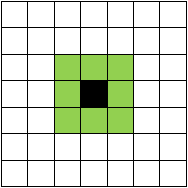
La determinación del número de vecinos se produce en el barrio de Moore.
Un poco de historia de fondo de Wikipedia.
John Conway se interesó por un problema propuesto en la década de 1940 por el famoso matemático John von Neumann, que intentaba crear una máquina hipotética que pudiera reproducirse a sí misma. John von Neumann logró crear un modelo matemático de tal máquina con reglas muy complejas. Conway intentó simplificar las ideas propuestas por Neumann y al final logró crear las reglas que se convirtieron en las reglas del juego de la vida.
La descripción de este juego se publicó por primera vez en la edición de octubre (1970) de Scientific American, bajo el título "Juegos de matemáticas" por Martin Gardner.
Estoy seguro de que estás cansado de toda esta teoría, comencemos a escribir una simulación en Python / Pygame
Python, .
pygame "pip install pygame" "pip3 install pygame" ( "pip " , PATH Python)
,
#
import pygame as p
from pygame.locals import *
# RGB
BLACK = (0 , 0 , 0)
WHITE = (255 , 255 , 255)
#
root = p.display.set_mode((1000 , 500))
#
while 1:
#
root.fill(WHITE)
#
for i in range(0 , root.get_height() // 20):
p.draw.line(root , BLACK , (0 , i * 20) , (root.get_width() , i * 20))
for j in range(0 , root.get_width() // 20):
p.draw.line(root , BLACK , (j * 20 , 0) , (j * 20 , root.get_height()))
# " "
for i in p.event.get():
if i.type== QUIT:
quit()
p.display.update()
-
-
system
count
"", counter.
count
# 2
cells=[ [0 for j in range(root.get_width()//20)] for i in range(root.get_height()//20)]
cells2=cells
# -
def near(pos: list , system=[[-1 , -1] , [-1 , 0] , [-1 , 1] , [0 , -1] , [0 , 1] , [1 , -1] , [1 , 0] , [1 , 1]]):
count = 0
for i in system:
if cells[(pos[0] + i[0]) % len(cells)][(pos[1] + i[1]) % len(cells[0])]:
count += 1
return count
, .
#
for i in range(len(cells)):
for j in range(len(cells[0])):
#
if cells[i][j]:
# 2 3
if near([i , j]) not in (2 , 3):
cells2[i][j] = 0
continue
#
cells2[i][j] = 1
continue
# 3
if near([i , j]) == 3:
cells2[i][j] = 1
continue
#
cells2[i][j] = 0
cells = cells2
#
import time
import pygame as p
import random
from pygame.locals import *
# RGB
BLACK = (0 , 0 , 0)
WHITE = (255 , 255 , 255)
#
root = p.display.set_mode((1000 , 500))
# 2
cells = [[random.choice([0 , 1]) for j in range(root.get_width() // 20)] for i in range(root.get_height() // 20)]
# -
def near(pos: list , system=[[-1 , -1] , [-1 , 0] , [-1 , 1] , [0 , -1] , [0 , 1] , [1 , -1] , [1 , 0] , [1 , 1]]):
count = 0
for i in system:
if cells[(pos[0] + i[0]) % len(cells)][(pos[1] + i[1]) % len(cells[0])]:
count += 1
return count
#
while 1:
#
root.fill(WHITE)
#
for i in range(0 , root.get_height() // 20):
p.draw.line(root , BLACK , (0 , i * 20) , (root.get_width() , i * 20))
for j in range(0 , root.get_width() // 20):
p.draw.line(root , BLACK , (j * 20 , 0) , (j * 20 , root.get_height()))
# " "
for i in p.event.get():
if i.type == QUIT:
quit()
#
for i in range(0 , len(cells)):
for j in range(0 , len(cells[i])):
print(cells[i][j],i,j)
p.draw.rect(root , (255 * cells[i][j] % 256 , 0 , 0) , [i * 20 , j * 20 , 20 , 20])
#
p.display.update()
cells2 = [[0 for j in range(len(cells[0]))] for i in range(len(cells))]
for i in range(len(cells)):
for j in range(len(cells[0])):
if cells[i][j]:
if near([i , j]) not in (2 , 3):
cells2[i][j] = 0
continue
cells2[i][j] = 1
continue
if near([i , j]) == 3:
cells2[i][j] = 1
continue
cells2[i][j] = 0
cells = cells2
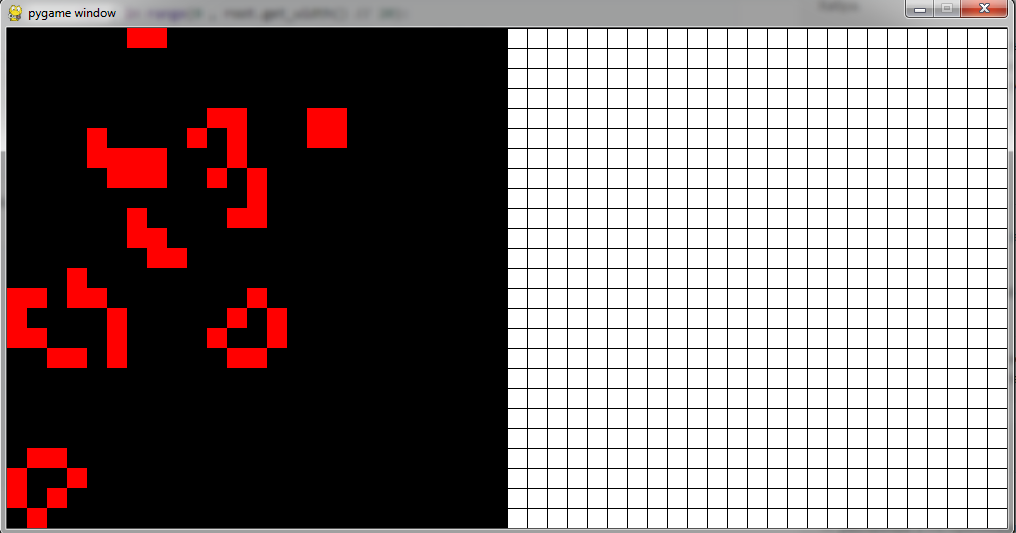
Todo salió bien, la velocidad tampoco frustra.
En los próximos artículos intentaremos implementar modificaciones del juego "Life".